October 3, 2008

MyPhone Explorer

MyPhoneExplorer is a proprietary freeware desktop application allowing management of Sony Ericsson mobile phones. It is developed in Austria but has been translated into many languages, including English. It is available from multiple download sites and has been downloaded over 1.5 million times.Softpedia have given it their 100% Free award, and visitors to Softpedia have rated MyPhoneExplorer very highly.

FEATURES
MyPhoneExplorer can connect to a Sony Ericsson phone using either USB cable, Bluetooth or Infra-red connections. Once connected, address book entries can be synchronised between the phone and MyPhoneExplorer, Microsoft Outlook, Microsoft Outlook Express, Mozilla Thunderbird or Google Mail. Calendar entries can also be synchronised with many systems, including Google Calendar.

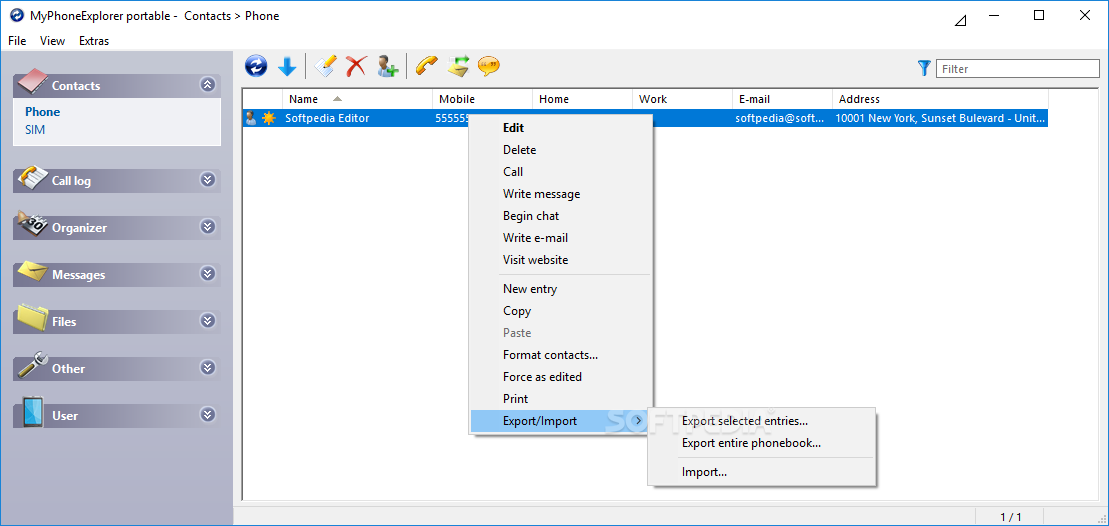
As with the PC Suite software which is normally shipped with Sony Ericsson mobiles, files can be dragged and dropped to and from the phone's memory and memory stick. Notably, however, MyPhoneExplorer also allows calls to be managed (i.e. dialled and answered) from within the application, and allows SMS text messages to be saved, read, written, sent, etc. directly from a PC.

DESCRIPTION
Develepor: FJ SOFTWARE
Size: 3.6 MB
OS: Windows All
License: Freeware (FREEBIESS!!!!)
Last Updated: August 21st, 2008, 19:04 GMT

SUPPORTED PHONES
MyPhoneExplorer was designed for use with Sony Ericsson K700, K750, K800 mobiles, but FJ Software state that it works with all Sony Ericsson phones which are not Symbian-based (i.e. it cannot interact with P series phones, the M600 or the W950).

The latest development does have support for Symbian-based SE phones, although not the older ones; P800, P900, P910. The M600i, W950i, W960i, P990i, P1i and G900 should work.

LANGUAGE TRANSLATION
Text displayed in MyPhoneExplorer (e.g. in column headings, message boxes, etc.) is read up from installed language files (e.g. English.lng), thereby allowing translation to other languages. MyPhoneExplorer comes with instructions on how to create new language files and there are approximately 40 languages for which such language files have been created (as of 14 October 2007).

DOWNLOAD SITE
FJ Soft

HOT SHOT
My Phone Explorer

My Phone Explorer

October 1, 2008

Hacking Friendster: Grabbing Background Picture

ok.. you found out this topic, so that mean you might want to try it later. It's not a big deal to grab somebody background picture in Friendster even if their profile is private 'coz we are not going to tell the owner of that profile that we want to grab their background. heh!..

Purpose
the purpose of this tutorial is to show you, the reader and of course you are one of the Friendster member. But, still you can use this tutorial to grab someone 'cool' bacground picture.

START
first of, go and find someone Friendster ID or profile that have cool background or you can go to your friends page and see if you like their background. if the answer is YES, then keep reading. If the answer is NO, then browse some other article in this Blog.

OK.. keep reading!!

For example, i will use someone Friendster ID. ( And of course, this is not my Friendster ID. it's someone that i don't even know who. lOl!!)

suppose that this is your friends ID: http://profiles.friendster.com/20224556

ok.. we go to that page. Now, go to View and click Page Source

Now, press CTRL+F and type image:url
now, the words are higlighted. what we need are the sentence after the url. where, in this tutorial, the words after URL, and inside the bracket is this: http://realpapa.ru/daily/syshack.JPG
***INFO: By now, the owner of this FS ID might have change his/her layout. So the background picture must have change too.

Copy the URL inside the bracket. (do not copy the bracket!!)

go to your browser and paste it in the adress bar. VOILLA!!! you got your picture.
to save that picture, just right-click and click Save image as..

ok.. happy PICTURE GRABBING!!